


I use shopping apps differently depending on what I am buying. For groceries, I want speed. For tools, I want enough detail to avoid making an expensive mistake, plus a practical way to check whether the item is actually worth picking up. Harbor Freight Tools is built for that second kind of shopping. It is the official shopping app from Harbor Freight Tools USA, Inc., and its focus is clearly the company’s own range of tools, equipment, storage, generators, air compressors, and workshop supplies.
After spending time with it, I see it as more than a mobile version of a product catalog, but not as a complete replacement for visiting a store or comparing specialist retailers. Its strongest role is helping an existing Harbor Freight customer plan a purchase, find a suitable product, keep track of deals, and reduce the amount of browsing needed before heading out. It is free, rated for Everyone, and available for devices running Android 8.0 or newer. The current version is 11.22.0, which gives the app a relatively mature feel rather than that of a newly launched shopping experiment.
The app has built a sizeable audience, with over a million installs and a 4.7 average from around 58 thousand ratings. Those numbers suggest that it is doing the basic job well for many shoppers. My own view is a little more nuanced: it is particularly useful when I already know I want something from Harbor Freight, while it becomes less compelling when I need broad, brand-neutral research across several retailers.
How the current shopping experience feels
The first thing I notice about this app is its practical orientation. It is not trying to be a general marketplace filled with unrelated sellers. The experience centers on Harbor Freight’s own inventory and the kinds of purchases people make for garages, workshops, home repairs, vehicles, construction projects, and outdoor power needs. That narrow focus is an advantage because the browsing journey feels more relevant than it would in a giant marketplace.
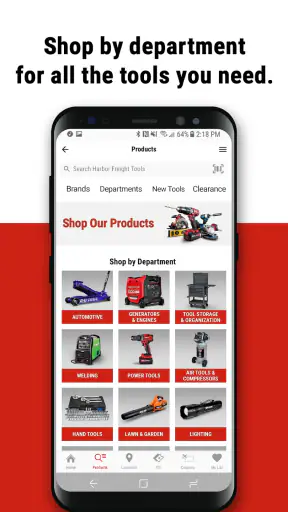
I can approach the app with a broad need, such as tool storage, or with a specific product in mind. That makes a difference. If I am replacing a damaged hand tool, I do not need to work through thousands of unrelated listings. If I am planning a larger project, I can use the product categories to move from a general idea toward equipment that fits the task. The app is most comfortable in that middle ground between casual browsing and purposeful shopping.
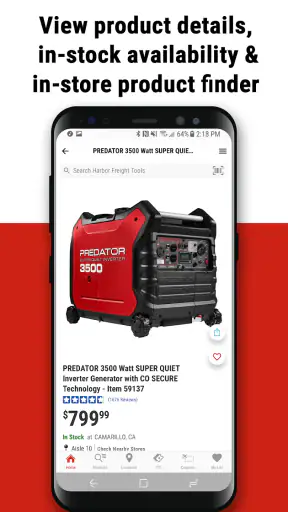
Product pages are important here because tools are rarely impulse purchases in the same way as clothing or snacks. I want to know what an item is intended to do, whether its size and design make sense for my workspace, and whether it belongs in the same price-and-performance range as alternatives. The app helps me get started with that evaluation, although I still prefer to read carefully and compare specifications before buying equipment that affects safety, lifting, cutting, power, or compressed air.
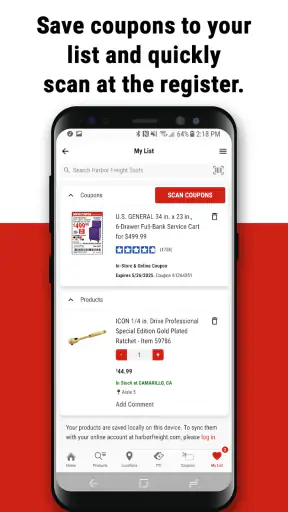
A useful habit is to open the app before leaving home, rather than waiting until I am already in the parking lot. That gives me time to check the product description, review available deal information, and decide whether I need a backup choice. For a routine purchase, this can turn a vague store visit into a short, focused trip. For a large item, it also helps me think about transport and whether I should confirm details directly with the store before making the journey.
The shopping experience is strongest when the app is treated as a planning tool. I would not rely on a quick glance at a product tile to make a decision about a generator or compressor. Those products involve capacity, intended use, maintenance, noise, accessories, and safe operation. The app can bring the options together, but good buying decisions still require attention from the shopper.
Deals are useful, but they can change the way you shop
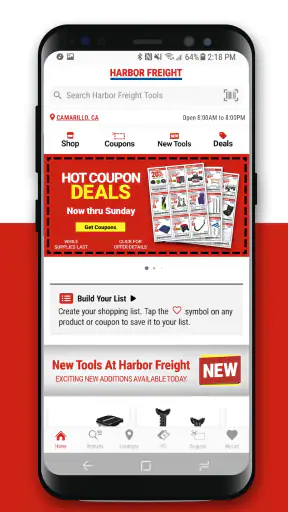
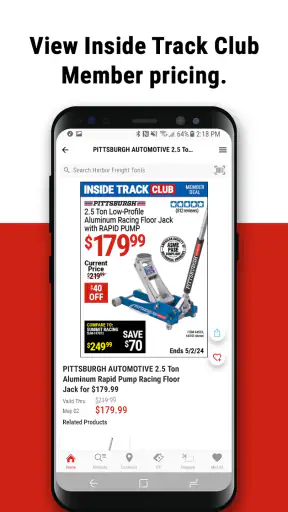
Promotions are naturally central to a Harbor Freight shopping experience, and the app makes deal discovery part of the normal browsing process. That can be helpful for planned purchases. If I know I will need storage, shop equipment, or a replacement tool soon, checking the app before buying may reveal a better time to complete the purchase.
The trade-off is that promotions can encourage me to buy something simply because it looks like a bargain. I find the app more valuable when I begin with a project list and use discounts to refine the timing, rather than browsing deals without a clear need. A lower price does not automatically make an unsuitable tool suitable, especially when the item will be used frequently or under demanding conditions.
My practical approach is to separate three questions: do I need the item, does it fit the job, and is this a sensible time to buy it? The app is good at helping with the third question. It can also support the first two, but it cannot replace measuring the available space, checking compatibility, or understanding the demands of the work.
Where it fits beside ordinary shopping alternatives
Compared with a general marketplace, this app feels less cluttered because it keeps the product universe tied to one retailer. That is a real benefit when I already trust the store as a destination and want to move quickly. A general marketplace is better when I need to compare many manufacturers, seller policies, shipping options, or used items in one place.
Compared with a retailer’s mobile website, a dedicated app can feel more convenient for repeated visits because I am returning to the same shopping environment. The distinction is not dramatic for a one-time visitor, though. If I only need to look up one product, a browser may be enough. The app earns its place when I shop at Harbor Freight repeatedly, check promotions, or use the phone as part of an in-store decision.
Compared with visiting the store without preparation, the app gives me a better chance of arriving with a shortlist. That matters for larger purchases, where wandering through aisles can be time-consuming and where a product that looks right at first glance may not suit the project. I still consider an in-person visit better for judging physical size, finish, feel, and packaging when those details matter.
What the latest version means for regular users
The current release, 11.22.0, shows that the app is being maintained as an ongoing shopping product rather than left untouched after launch. It was first released on September 28, 2020, so the experience has had time to mature through successive updates. I would describe its evolution in practical terms: the app now feels like an established companion for Harbor Freight shopping, not merely a digital brochure.
That distinction matters for people who have used earlier versions. A mature shopping app should make routine actions feel predictable: opening the catalog, locating a product, checking offer information, and preparing for a store visit. The value of continued development is not always a dramatic new feature. Sometimes it is a smoother path through familiar tasks and fewer reasons to abandon the app and switch to a browser.
I am careful not to treat the version number as proof that every part of the experience has changed recently. A current version confirms the state of the software, but it does not by itself tell me that a particular screen, feature, or policy has been redesigned. What I can say is that the app’s present identity is that of a maintained, retailer-specific shopping tool, and existing users should approach updates as refinements to an established workflow rather than expect an entirely different product.
For a returning user, the main effect is continuity. If the app already fits the way you shop, there is a good reason to keep it available. You can make it part of a repeatable routine: identify the job, search the relevant product family, inspect the details, check current offers, and decide whether the next step is online planning or an in-store visit.
One advanced but simple workflow is to use the app in two passes. On the first pass, I gather candidates without rushing to buy. I look for the right type of product and note the differences between similar items. On the second pass, I revisit the shortlist with the actual project in mind: available space, required accessories, expected frequency of use, and whether I need portability or extra capacity. This prevents the deal section from becoming the only factor guiding the purchase.
A realistic weekend repair scenario
Imagine that I am preparing to repair a fence over the weekend. I may need a drill, fasteners, storage for small parts, and perhaps a replacement hand tool. Instead of arriving at the store with only a vague idea, I can use the app to identify the product categories first. I can compare the likely candidates, check whether the items match the scale of the project, and make a short list on my phone.
When I reach the store, the app remains useful as a reference. I can confirm the product name or search again if the packaging is difficult to distinguish from a similar item. If the exact choice does not feel right in person, the earlier browsing still helps because I have already seen alternatives. The app has not completed the project for me, but it has reduced the chance of making a rushed decision.
There is another benefit in this scenario: I can identify missing pieces before I leave home. A tool purchase often fails because the shopper forgets a bit, blade, fitting, battery-related requirement, storage item, or protective accessory. I would not assume that every related item is automatically included just because products appear near one another in the app. Instead, I use the catalog to create a checklist and verify each component separately.
Who will get the most value
This app is a good match for Harbor Freight regulars, do-it-yourself homeowners, hobbyists, mechanics, workshop owners, and anyone who frequently buys tools or equipment from the retailer. It is also useful for a person who prefers to research privately before asking questions in a store. Browsing on a phone gives me time to understand the basic choices without feeling pressured to decide immediately.
It can also help occasional shoppers who have a defined purchase in mind. If I need a generator or an air compressor, I would rather begin with the retailer’s product range than walk in without preparation. The app gives me a central place to start, even though I would still verify the technical requirements of the job before purchasing.
I would be less likely to recommend it as a primary shopping app to someone who wants one place for every brand and retailer. It is not the right first choice for broad market research, price tracking across unrelated stores, or finding secondhand equipment. If brand comparison is the main goal, a general shopping service or specialist tool resource may be more efficient.
Small frictions that affect the decision
The biggest limitation is the app’s natural narrowness. Because it is tied to Harbor Freight, the catalog is convenient when I want Harbor Freight products but not when I want an impartial view of the entire tool market. I may still need another source to compare professional-grade alternatives, read long-term ownership experiences, or investigate compatibility across brands.
Large equipment also exposes the limits of mobile shopping. A phone screen is fine for narrowing options, but it is not the best place to absorb every consideration involved in a major purchase. I want room to compare specifications, think about transport, and check whether my workspace can support the item. For those decisions, the app is a starting point rather than the final authority.
Another point of friction is the difference between discovering an item and completing a successful purchase. A product can look suitable online but turn out to be unavailable, inconvenient to collect, or poorly matched to the project once I examine it more closely. I treat the app as a way to prepare, then confirm the practical details before committing time or money.
Users who dislike promotional browsing may also find the experience distracting. Deals are helpful when they support a plan, but they can pull attention away from the original need. I recommend deciding on the required product type before opening promotional sections. That small change keeps the app working for me instead of letting the app shape the project.
Privacy, age suitability, and everyday accessibility
The Everyone content rating makes the app suitable for a broad audience from a content perspective. That does not mean every product is appropriate for every user to operate. A young person may be able to browse the catalog, while generators, power tools, cutting equipment, and compressed-air products still require adult judgment, proper training, and safe handling.
The Android 8.0 minimum requirement is helpful for people using older phones, although compatibility is still something I would consider before relying on the app on an aging device. A shopping app does not need to be installed on every family member’s phone. In a household, one person can use it to prepare the list while the actual buyer checks the purchase details.
Since the app is free, the main cost is not access to the software but the time spent researching and the money spent on the products themselves. That makes it easy to keep installed for occasional use. I would still avoid leaving it as a source of constant temptation if I am prone to buying tools without a defined project.
What I would like users to watch over time
For future updates, I would pay attention to how effectively the app handles the gap between online discovery and real-world shopping. Better clarity around product details, store planning, and the steps needed before a large purchase would have more value to me than decorative interface changes. The best improvement would be anything that makes a prepared shortlist more reliable when I move from the phone to the store.
I would also watch whether the app remains useful for both small purchases and major equipment. Hand tools are relatively easy to browse, while generators, compressors, and storage systems demand more context. A strong retailer app should serve both without making the simple tasks feel heavy or the complex tasks feel oversimplified.
Existing users should judge updates by their daily workflow. If searching, comparing, and preparing purchases remain straightforward, the app is doing its job. If a change makes promotional content harder to separate from essential product information, that would be a meaningful drawback even if the interface looked newer.
For my own use, the most valuable habit is to treat the app as a decision aid rather than a substitute for judgment. I use it to organize a project, narrow the Harbor Freight selection, inspect the available choices, and plan the store visit. I do not use it as the only source for technical safety decisions or brand-wide comparisons.
Overall, Harbor Freight Tools is a practical, focused shopping app that makes the most sense for people who already buy from Harbor Freight or expect to do so regularly. Its free access, broad age rating, established development history, and strong user response make it easy to recommend as a companion for tool shopping. Its real strength is turning an unplanned store trip into a prepared buying process.
I would skip it if my priority were comparing every tool brand in one neutral marketplace, but I would keep it installed for workshop projects, home repairs, and equipment research within the Harbor Freight range. Used with a checklist and a little skepticism toward impulse deals, it is a useful everyday app rather than just another retailer catalog.


